Photo
Take a picture of the plate. Brink identifies the likely items and estimates calories and macronutrients, which you confirm or adjust.
Best for meals you did not cook yourself.
Most nutrition apps fail on effort, not accuracy. Brink gives you three ways to log a meal so there is always one that fits the moment you are in.
Yes. Photograph a meal and Brink identifies the likely items and estimates calories, protein, carbohydrates and fat, which you review and correct before saving. You can also describe a meal in plain text or enter the numbers manually. Estimates are approximations, not measurements.
Take a picture of the plate. Brink identifies the likely items and estimates calories and macronutrients, which you confirm or adjust.
Best for meals you did not cook yourself.
Describe the meal in a sentence, such as two eggs, toast and a flat white. Brink turns the description into an entry.
Best for simple meals and quick logging.
Enter calories and macronutrients yourself when you already have the numbers from a label or a recipe.
Best when accuracy matters most.
Every entry rolls up into the four numbers that matter for most goals: calories, protein, carbohydrates and fat. Your daily targets sit alongside them, so you always know what is left rather than only what you have eaten.

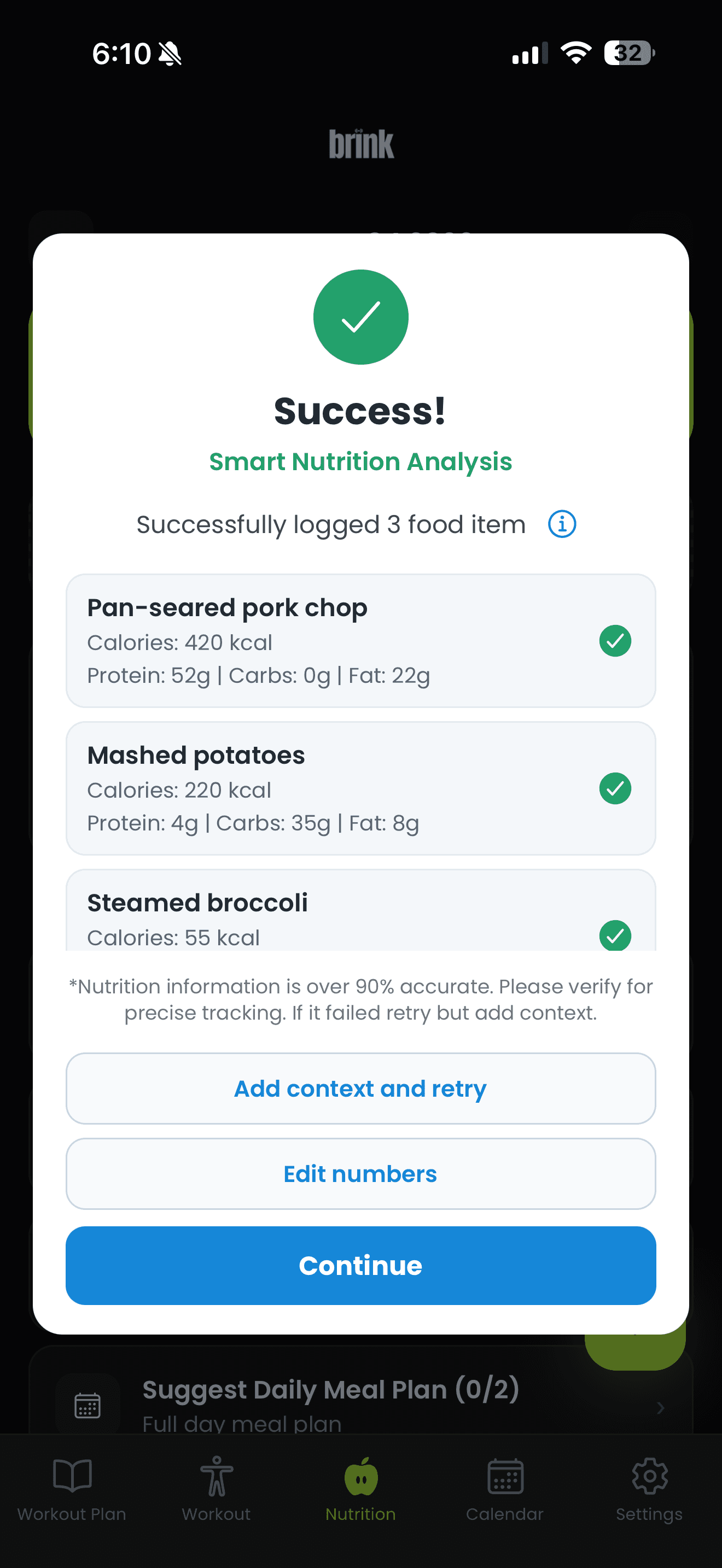
You photograph the meal, and Brink returns a list of likely items with estimated portions, calories and macronutrients. You review the list, correct anything that is wrong, and save it.
The review step is the important part. A photo can show what is on the plate, but it cannot show the oil in the pan, the exact weight of the rice or the sugar in the sauce. The estimate gets you most of the way in a few seconds, and a quick correction handles the rest.
Perfectly accurate tracking that you abandon after nine days is worth less than approximate tracking you keep up for six months. The point of logging is to see patterns: whether protein is consistently low, whether weekends look nothing like weekdays, whether your intake matches the goal you set.
That is also why nutrition and training live in the same app. Your calorie target exists because of what you are training for, and your training load is easier to sustain when you are eating enough to support it.
See how Brink plans your training or read about the AI personal trainer.
Brink is a fitness and nutrition tool, not a medical service. It does not diagnose or treat any condition, and results vary from person to person. Speak with a qualified professional before starting a new training or nutrition program.
It is an estimate. A photo cannot show hidden oils, exact portion weights or every ingredient, so the numbers Brink returns may vary from the true values. Treat them as a useful approximation and correct anything that looks off.
Yes. Describe the meal in plain text, or enter calories and macronutrients manually if you already know them.
Calories, protein, carbohydrates and fat, shown against your daily targets.
They follow the goal and details you set up in the app, and you can adjust them if you prefer different numbers.
No. Brink is a general fitness and nutrition tool. It is not a substitute for advice from a physician or registered dietitian, and it should not be used to manage a medical condition or an eating disorder.
Download Brink and see your calories and macros without the data entry.
Free to download, with a paid subscription for full access.