Skip to content

Available on iPhone

Your training and nutrition, planned together.

Brink is an AI personal trainer that builds a workout plan around your goals, your equipment and the days you can actually train. Log your sets, track your meals, and let the plan keep up with you.

Free to download, with a paid subscription for full access. Cancel any time through the App Store. No fitness experience required.
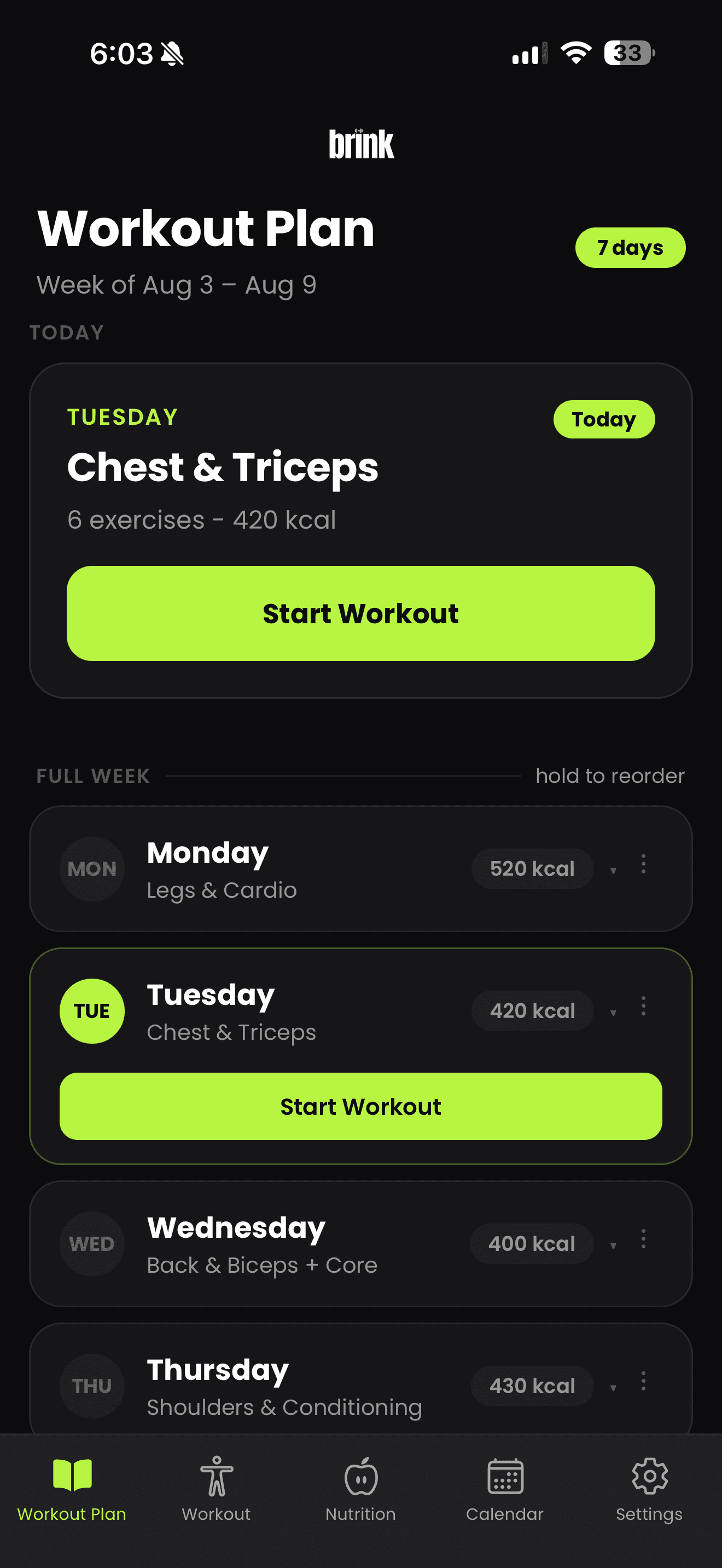
A weekly Brink workout plan listing each day's session, from Legs and Cardio on Monday through to Shoulders and Conditioning on Thursday.
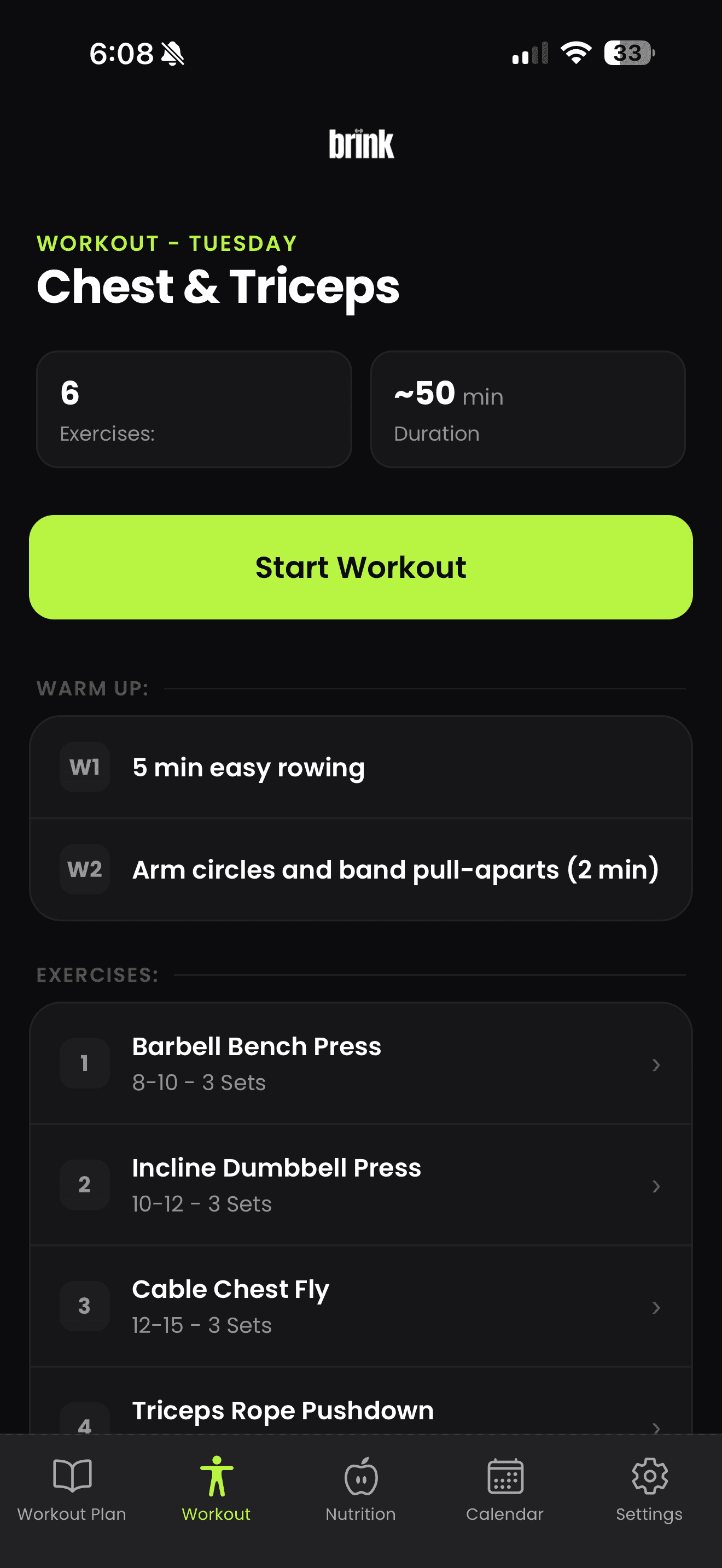
The Brink workout screen showing Tuesday's Chest and Triceps session, six exercises, an estimated 50 minute duration and a Start Workout button.

What is Brink?

Brink is an AI personal trainer and nutrition app for iPhone that builds personalized workout plans from your goals, experience, equipment and schedule, tracks the sets you complete, and logs meals by photo, text or manual entry.

Platform
iPhone, on the App Store
Category
Fitness and nutrition
Price
Free to download, with a paid subscription for full access.
Requires
Requires an iPhone running a recent version of iOS.
Inside the app

A fitness app that respects your attention

Brink keeps the work small: see the plan, log the set, capture the meal. Everything else stays out of the way.

  • The Brink workout screen showing Tuesday's Chest and Triceps session, six exercises, an estimated 50 minute duration and a Start Workout button.

    One screen for the day

    Today's session and your remaining calories and macros, without opening two apps.
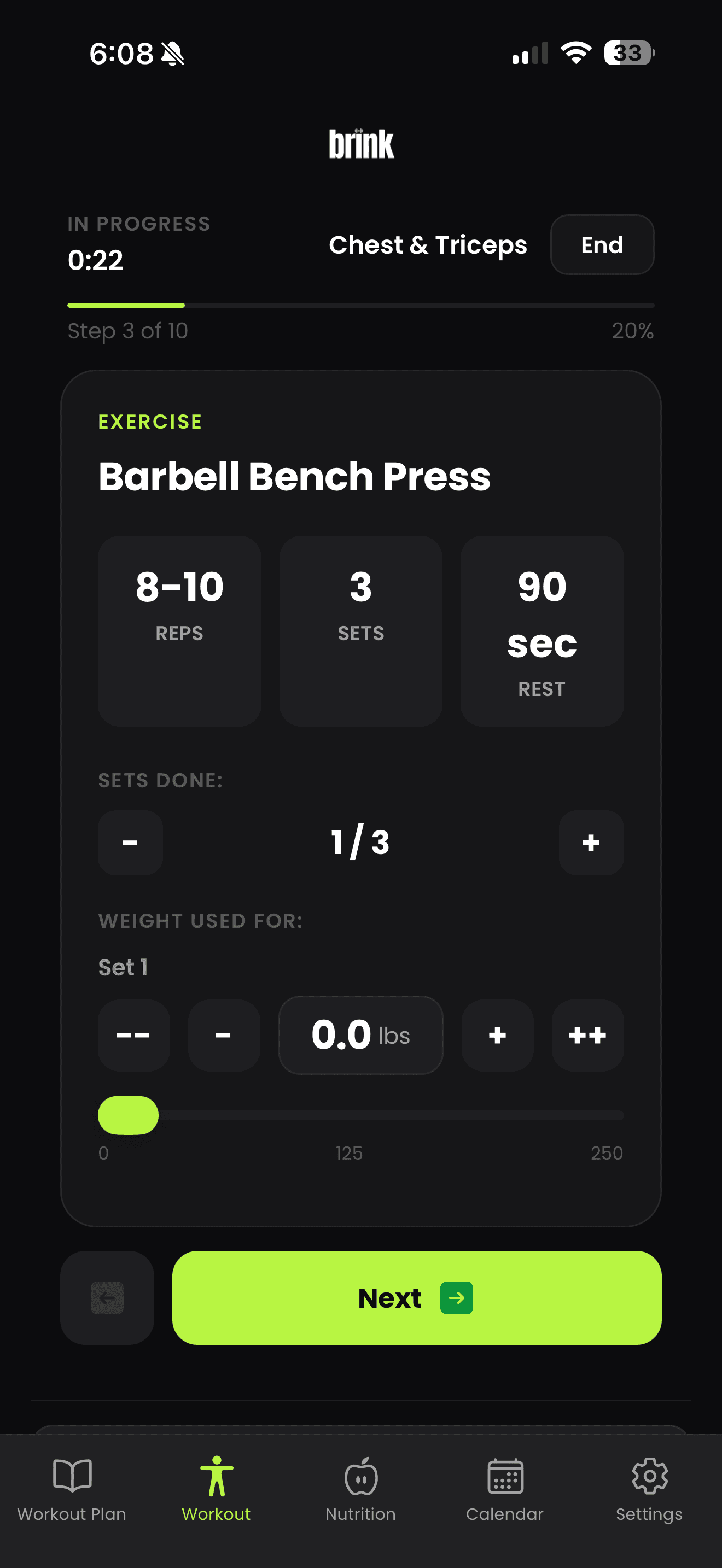
  • A workout in progress in Brink, logging barbell bench press with target repetitions, sets completed, rest time and the weight used.

    Built for mid set

    Log weight and repetitions in a tap, with a rest timer running between sets.
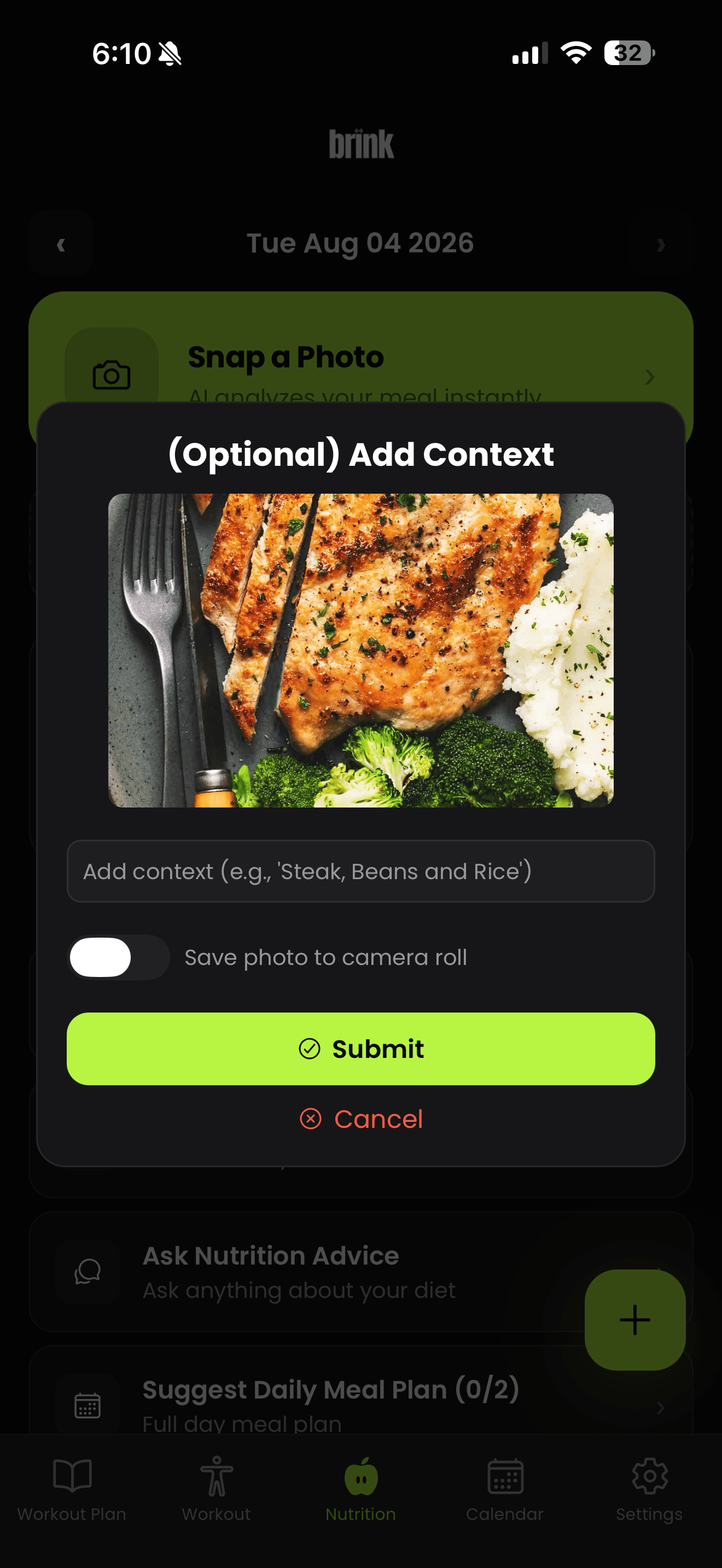
  • Adding optional context to a photographed meal in Brink before submitting it for nutritional analysis.

    Meals in seconds

    Photograph a plate and Brink estimates the items, calories and macros for you to confirm.

Swipe to see more screens.

Why people use Brink

Less deciding. More training.

Most people do not quit because they lack effort. They quit because the plan is confusing, the tracking is tedious, and nothing adapts when life changes.

Stop guessing what to train

Open the app and today's session is already there, with the exercises, sets and target repetitions chosen for you.

Train around your real week

Set how many days you can train and how long a session should run. Brink plans to fit that, not the other way around.

Log meals without the tedium

Snap a photo, describe a meal in a sentence, or enter it manually. Brink estimates the calories and macros for you.

See progress you can trust

Every set you log builds a history. Weights, volume and consistency are laid out clearly instead of buried in a spreadsheet.

Change the plan, not your habits

Goals shift, gyms change, schedules break. Tell Brink what changed and the plan is rebuilt around it.

Training and nutrition in one place

Your calorie and protein targets sit next to your workouts, so the two halves of your progress stay connected.

AI personal trainer

A plan built from your answers, not a template

Brink asks what matters: what you are working towards, how long you have been training, what equipment you can reach and how often you can show up. The plan follows from that.

  • Set a goal and Brink structures the week around it
  • Experience level shapes exercise selection and starting loads
  • Only equipment you actually have gets programmed
  • Training frequency and session length are yours to set
  • Tell Brink what you liked or disliked and the plan responds
  • As your logged sessions add up, suggestions progress with you

Brink is a fitness and nutrition tool, not a medical service. It does not diagnose or treat any condition, and results vary from person to person. Speak with a qualified professional before starting a new training or nutrition program.

How the AI trainer works
The Brink workout screen showing Tuesday's Chest and Triceps session, six exercises, an estimated 50 minute duration and a Start Workout button.
A weekly Brink workout plan listing each day's session, from Legs and Cardio on Monday through to Shoulders and Conditioning on Thursday.
Workout planning

Every session is written before you arrive

Exercises, sets and target repetitions are laid out in order. Open the session, work through it, and log as you go.

  • Full training weeks generated around your schedule
  • Exercise selection matched to your equipment and level
  • Clear set and repetition targets for every movement
  • Log weight and repetitions set by set
  • A rest timer between sets so your pacing stays honest
  • Swap an exercise or restructure the week whenever you want
Explore the workout planner
A weekly Brink workout plan listing each day's session, from Legs and Cardio on Monday through to Shoulders and Conditioning on Thursday.
A workout in progress in Brink, logging barbell bench press with target repetitions, sets completed, rest time and the weight used.
Nutrition tracking

Log a meal in the time it takes to sit down

Photograph the plate, type a sentence, or enter the numbers yourself. Brink turns it into calories, protein, carbohydrates and fat against your daily targets.
  • Photo based estimates you can review and correct
  • Plain text entry for meals you can describe in a line
  • Manual entry when you already have the numbers
  • Calories, protein, carbohydrates and fat in one view
  • Daily progress that updates as you log
  • Suggestions that follow the goal you set

AI generated nutrition estimates are approximations. Values can vary with portion size, preparation and ingredients you cannot see in a photo, so review and edit entries when accuracy matters to you.

See how nutrition tracking works
Adding optional context to a photographed meal in Brink before submitting it for nutritional analysis.
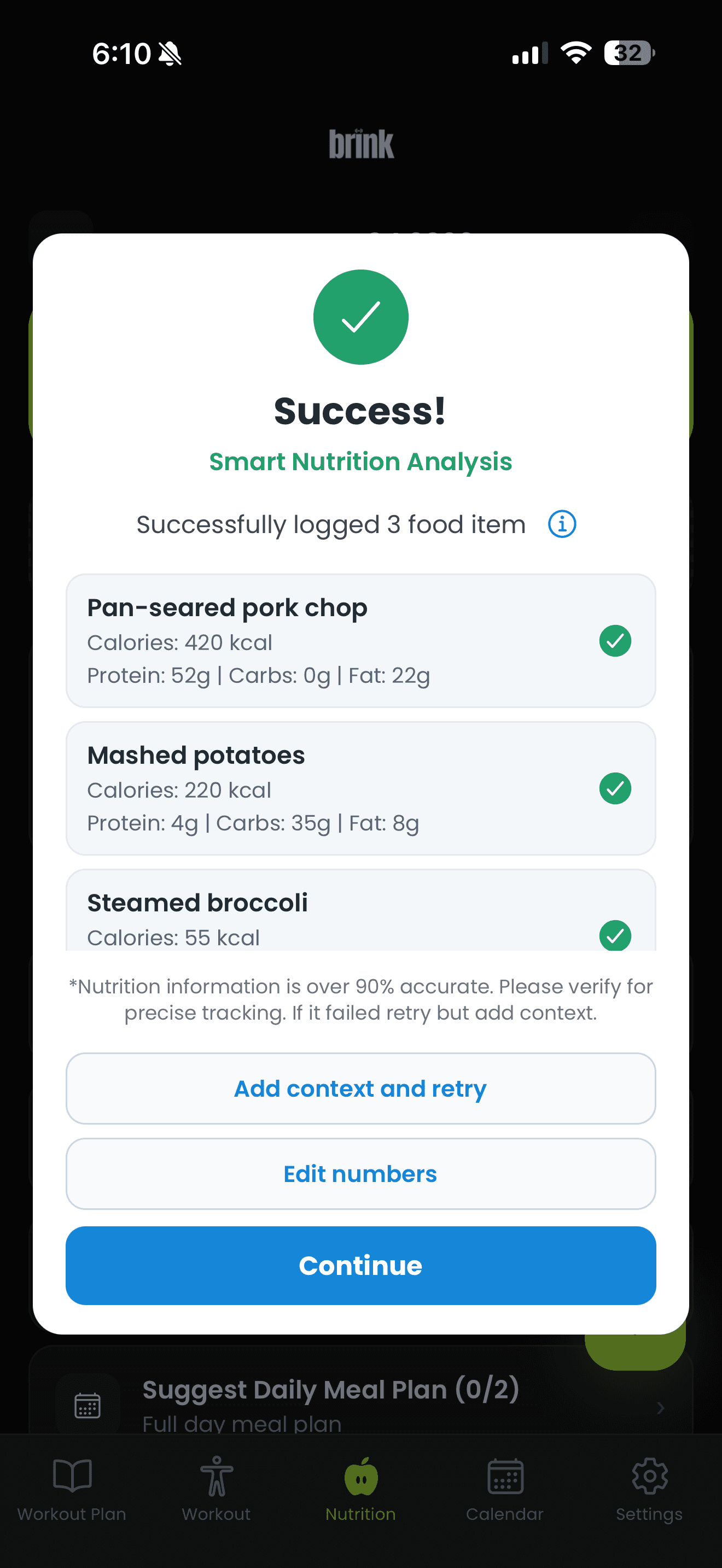
Brink's meal analysis result listing pan-seared pork chop, mashed potatoes and steamed broccoli, each with calories, protein, carbohydrates and fat.
How it works

From a few answers to a plan you can follow

Setup takes minutes. After that, Brink is something you open, use and close.

  1. 01

    Tell Brink your goals

    Share what you want to work towards, your experience level, the equipment you can reach and how often you can train.

  2. 02

    Get a personalized plan

    Brink builds a structured plan with specific exercises, sets and repetition targets for each session in your week.

  3. 03

    Track workouts and meals

    Log sets as you lift, use the rest timer between them, and record meals by photo, text or manual entry.

  4. 04

    Adjust and keep improving

    As you log more, Brink suggests progressions and adapts. Edit anything yourself at any point.

Everything included

What you get in Brink

The whole app in one list. Nothing here is an add on.

Personalized workout plans

Full training weeks built from your goals, experience and available time.

AI-assisted adjustments

Plans update as your inputs, feedback and training history change.

Nutrition photo tracking

Photograph a meal and get an estimate of its calories and macros.

Text and manual meal logging

Describe a meal in plain language or enter the numbers yourself.

Rest timers

A built in timer between sets so your rest periods stay consistent.

Exercise and set tracking

Record sets, repetitions and weight for every exercise you complete.

Progress monitoring

Review your training history and see how your numbers move over time.

Goal-based recommendations

Training and nutrition suggestions that follow the goal you set.

Equipment-aware planning

Home, hotel gym or full facility. Brink only programs what you can use.

Flexible plan editing

Swap an exercise, move a session or change the structure whenever you want.

Multi-language support

Use Brink in a language that suits you.

A simple mobile experience

Built for one hand, mid set, without hunting through menus.

How Brink is different

Compared with the usual ways people plan training

Spreadsheets, printed programs and app pairs all work for someone. Here is what changes when the plan and the tracking live in one place.

Getting started

A spreadsheet
You design the whole program yourself.
A static plan
Someone else's template, not built for you.
Two separate apps
Two setups, two logins, two habits.
Brink
Answer a few questions and your plan is ready.

When your week changes

A spreadsheet
Rebuild the sheet by hand.
A static plan
The plan stays the same regardless.
Two separate apps
Adjust each app separately.
Brink
Update your inputs and the plan is rebuilt.

Equipment you actually have

A spreadsheet
Only if you researched substitutes.
A static plan
Usually assumes a full gym.
Two separate apps
Depends on the workout app.
Brink
Exercises are chosen from equipment you select.

Logging nutrition

A spreadsheet
Manual entry, every item.
A static plan
Not included.
Two separate apps
A separate app and separate habit.
Brink
Photo, text or manual entry in the same app.

Seeing the full picture

A spreadsheet
Scattered across tabs.
A static plan
No tracking at all.
Two separate apps
Training and food never meet.
Brink
Workouts and nutrition side by side.
Questions

Common questions about Brink

Read the full FAQ

What is Brink?

Brink is an AI personal trainer and nutrition app for iPhone. It builds a workout plan around your goals, equipment and schedule, tracks the sets you complete, and lets you log meals by photo, text or manual entry.

Who is Brink designed for?

People who want structure without hiring a coach or building their own program. It suits beginners who need a starting point, and experienced lifters who want their training and nutrition tracked in one place.

Does Brink create personalized workout plans?

Yes. Plans are generated from what you tell Brink about your goal, experience level, available equipment, training frequency and preferences, and they change as you log training and update those inputs.

Can Brink track nutrition from a photo?

Yes. You can photograph a meal and Brink estimates its calories and macronutrients. Estimates are approximations, not laboratory measurements, and you can correct any entry by hand.

Can I edit my workout plan?

Yes. You can swap exercises, change sets and repetitions, move sessions around your week or ask for a different plan. Nothing is locked.

Do I need gym equipment?

No. Tell Brink what you have, whether that is a full gym, a few dumbbells and a band, or nothing at all, and it programs around it.

Brink in one paragraph

Brink is an AI personal trainer and nutrition app for iPhone, published at brinkapp.ca. It generates personalized workout plans from your goals, experience level, available equipment and training frequency, then tracks the exercises, sets, repetitions and weights you complete. Meals can be logged by photo, by text description or manually, with calories, protein, carbohydrates and fat shown against daily targets. Plans can be edited at any time and adjust as your inputs and training history change. Brink is a fitness and nutrition tool, not a medical service, and AI generated nutrition estimates are approximate.

Train with a plan that fits your life

Set your goal, tell Brink what you have to work with, and start your first session today.

  • No account needed to browse this site
  • No trackers on this page
  • Requires an iPhone running a recent version of iOS.
The Brink workout screen showing Tuesday's Chest and Triceps session, six exercises, an estimated 50 minute duration and a Start Workout button.